
AI Usage Limits
Stride AI Usage Limits
Stride's AI features, including the Training Planner, use monthly credits based on your subscription plan. This guide explains how usage is tracked, how to check it, what happens at the limit, and how to manage it.
How AI Usage Works#
- Each interaction with AI features consumes usage credits.
- Your monthly credit allocation depends on your subscription tier.
- Usage automatically resets at the start of each billing cycle, giving you a fresh allocation every month.
Checking Your Usage#
You can monitor your AI usage in two places:
In the Training Planner panel#
- When you reach about 75% of your monthly limit, a usage indicator appears in the Training Planner header.
- This serves as an early warning so you can adjust your usage before you run out.
In your account settings#
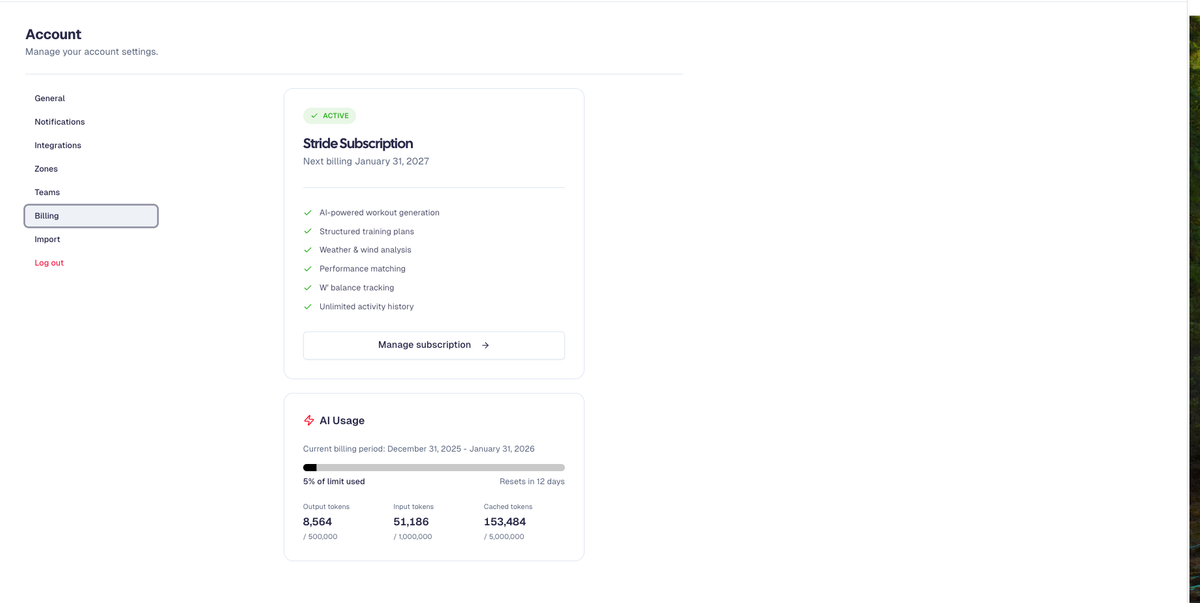
- Go to Account > Billing.
- There you can see:
- Current AI usage
- Remaining allocation
- The date your billing cycle resets
What Happens at the Limit#
- If you exceed your monthly AI usage limit, AI features may become temporarily unavailable.
- You will see a message indicating that you've reached your limit.
- Your existing training plans and calendar are not affected.
- You simply won't be able to generate new AI-powered plans until your usage resets at the next billing cycle.
Managing Your Usage#
Use these strategies to get the most from your AI allocation:
- Be specific in your requests
Provide clear, detailed prompts so the AI can give better results in fewer interactions.
- Use the refinement feature
Instead of starting a new plan from scratch, refine or adjust your existing plan within the same conversation.
- Plan ahead
Schedule major planning sessions (for example, building a full season plan) when you know you have plenty of usage remaining.
Need More?#
- If you regularly hit your usage limit, contact support@stride.is and the team can help you find the right solution for your needs.
- Stride is working on adding in-app purchasing of additional AI credits, which will be available in a future update.
When Your Usage Resets
Your AI usage resets automatically at the start of each billing cycle. You do not need to take any action—your full monthly allocation becomes available again on that date.